Choosing the right AI model in Recall
For an overview of library-wide chat, see the Chat overview. To control tone and output style, see Chat Personas.
Choosing your AI model is a Max plan feature. On Plus, Recall picks the best model for each task automatically.
Max gives you direct access to frontier models from OpenAI, Anthropic, Google, xAI, and DeepSeek, plus Auto when you would rather not choose. If you want to compare models for your own workflows, you can try the Max plan with a 30-day refund.
The chat interface
Before comparing models, it helps to know what each control in chat does:
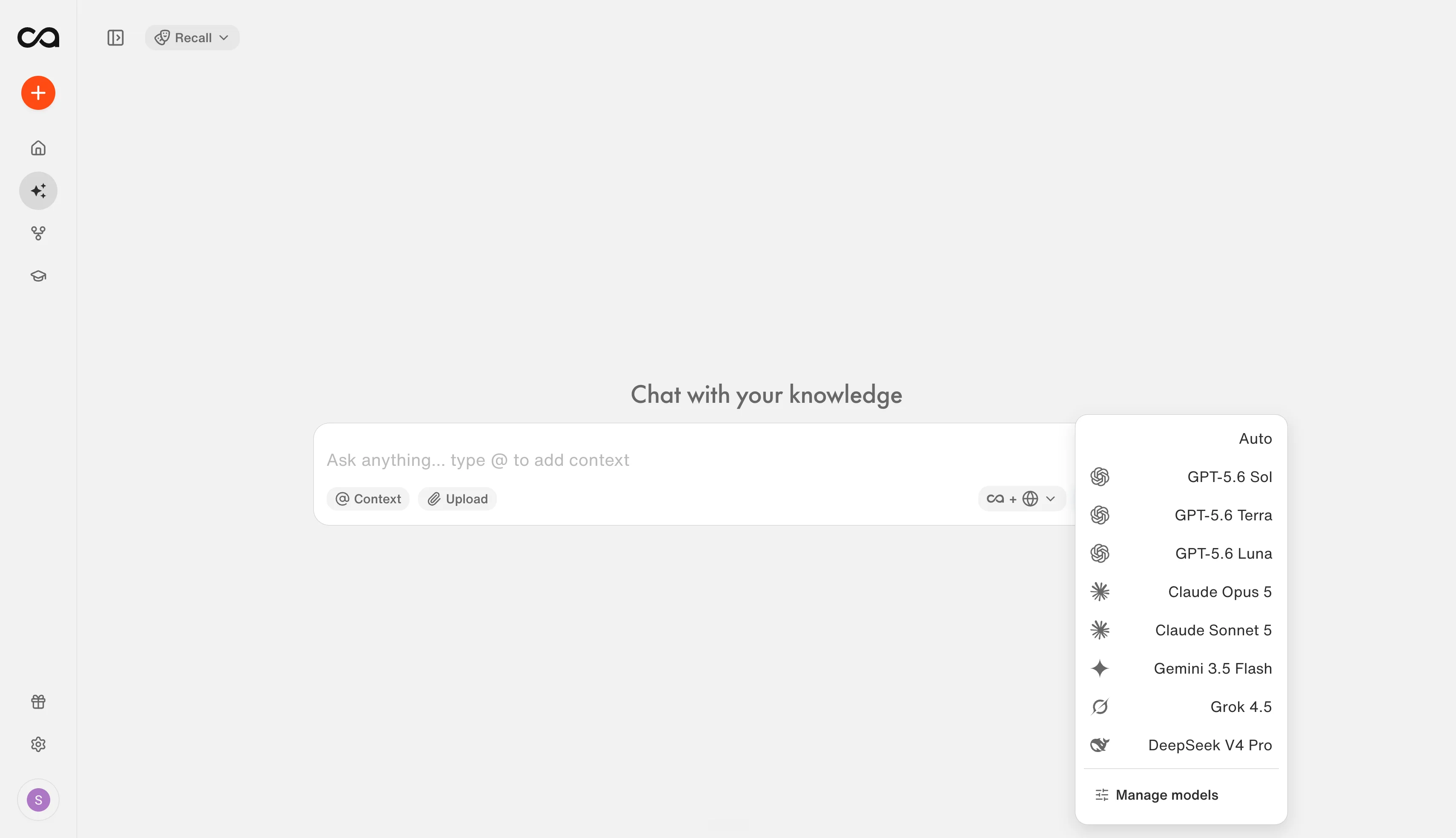
| Control | What it does |
|---|---|
| Personas (top left, shown as Recall when no persona is active) | Choose a saved set of instructions that controls tone, role, and output style before Recall generates an answer. When no persona is selected, this shows Recall (the default). See Chat Personas to create and manage personas. |
| Source selector (bottom of the chat box) | Choose where the answer can draw from: Recall (your saved knowledge base only), Web (the internet only), or Recall + Web (both). Use Recall when you want answers grounded in what you have saved. |
| Model selector (bottom right of the chat box) | Choose Auto or a specific frontier model. This is the Max plan feature this page is about. Auto lets Recall pick based on your task; manual selection is for when you want a particular strength, speed, or writing style. |
| Upload (paperclip icon) | Attach images, documents, or code files to the current message. These files apply to this conversation only; they are not added to your library. |
| @ Context | Pin specific saved cards or tags so chat focuses on them. You can click @ Context or type @ in the message field, then search for a card, tag, or folder. Tagged context appears above the input until you remove it. |
Quick recommendation
Not sure where to start? Match your task to a model below. The “Why” column reflects each provider’s own stated positioning; see the scorecard for documentation links and detailed ratings.
| If you need… | Start with… | Why |
|---|---|---|
| Strong everyday research and writing | Claude Sonnet 5.5 or GPT-6 Sol | Anthropic positions Sonnet 5.5 as its best combination of speed and intelligence, and OpenAI positions Sol as the cost-efficient high end of GPT-6. This is the best manual starting point for most Recall chat. |
| Content recommendations from your knowledge base | Claude Opus 5.5 or GPT-6 Sol | Recommendations require understanding your context, making connections, and judging relevance. Both models excel at research, reasoning, and judgment. For faster recommendations, try Claude Sonnet 5.5 |
| Fast, cost-efficient analysis | Grok 4.7 | xAI serves it at the same price and speed as its predecessor, while it works longer on difficult tasks and checks its own work more carefully |
| Summaries, extraction, and routine processing | GPT-6 Luna or Gemini 3.8 Flash | Luna is OpenAI’s most efficient model for focused, high-volume tasks like summaries and reformatting. Gemini 3.8 Flash is Google’s most intelligent Flash model, for the same speed with stronger analysis or visual material like charts and screenshots |
| The most careful analysis and judgment | Claude Opus 5.5 or GPT-6 Sol | Both are rated Excellent for judgment in the scorecard; Opus 5.5 leans toward nuanced interpretation, Sol toward systematic verification. See the Opus 5.5 vs. Sol FAQ |
| Very large amounts of text | DeepSeek V4 Pro | One-million-token context window handled with a fraction of the usual compute cost, though it is not the most reliable model for detailed long-context retrieval |
| Mixed tasks or no preference | Auto | Lets Recall choose based on your task. Best when you do not want to pick a model manually |
Recall’s models are not ranked on a single “best to worst” scale. Different models are useful for different kinds of knowledge work. The sections below explain how Recall evaluates models, show the full scorecard, and go into detail on each model.
How we evaluate models
A typical Recall task asks a model to understand your question, select the right saved sources, ignore near-misses, extract evidence accurately, handle contradictions, and produce a scoped answer without inventing details. No single public benchmark covers that full workflow, so Recall rates models on the dimensions that matter for knowledge-base work.
We combine independent benchmarks, provider evaluations, and direct testing on Recall-style tasks. The labels in the scorecard below are product guidance based on that evidence, not precise numerical scores.
| Dimension | What we ask | How we measure it |
|---|---|---|
| Responsiveness | How quickly will I get an answer? | Time to first word, how quickly the rest of the answer appears, and end-to-end time on real Recall questions. A model can write quickly once it starts but still feel slow if it thinks for a long time first. |
| Research | Can it find and connect the right evidence? | Source selection from your knowledge base, coverage of important evidence, contradiction handling, and whether claims map back to real saved content. |
| Writing | Will the result be clear and useful? | Structure, clarity, concision, tone, and faithfulness to sources. See writing styles for how models differ in prose. |
| Reasoning | Can it solve a difficult multi-step question? | Tasks that require combining several pieces of saved evidence, keeping a correct chain of logic, and finishing multi-step investigations without collapsing into a vague summary. |
| Judgment | Can it handle ambiguity and uncertainty responsibly? | Qualifying incomplete evidence, presenting conflicting sources fairly, hedging or refusing when the knowledge base does not support a confident answer, and care with high-stakes material. |
| Processing | Is it good for summaries, extraction, classification, and transformation? | Accuracy and completion time on high-volume, clearly defined tasks, plus how well it follows simple extraction or reformatting instructions. |
| Long documents | Can it retain important details across large inputs? | Recall of facts distributed across long cards and large collections, including details from the middle or end of long inputs. A large context window is not enough on its own. |
| Groundedness | Does it make only claims supported by the sources? | Unsupported-claim rate and whether citations actually back the statements. |
| Instruction following | Does it honor format, scope, and constraints? | Whether the answer respects requested format, source limits, date limits, tone, length, and exclusions. |
Recall-oriented scorecard
These ratings use the criteria above. They are evidence-informed product guidance for Recall workflows, not a single universal ranking. Click a model name to jump to its guidance below. Release dates and documentation links are sourced directly from each provider.
| Model | Release date | Documentation | Best for | Responsiveness | Research | Writing | Reasoning | Judgment | Processing | Long documents |
|---|---|---|---|---|---|---|---|---|---|---|
| GPT-6 Sol | Sep 22, 2026 | OpenAI | Deep research and complex analysis | High | Excellent | Excellent | Excellent | Excellent | Very good | Excellent |
| GPT-6 Luna | Sep 22, 2026 | OpenAI | Fast summaries and processing | Excellent | Good for bounded work | Good for drafts | Good | Good | Excellent | Limited reliability at depth |
| Claude Opus 5.5 | Sep 22, 2026 | Anthropic | Maximum judgment and analytical quality | Moderate | Excellent | Excellent | Excellent | Excellent | Very good | Excellent |
| Claude Sonnet 5.5 | Sep 28, 2026 | Anthropic | Fast, capable everyday research | High | Very good | Very good | Very good | Very good | Very good | Very good |
| Gemini 3.8 Flash | Sep 2, 2026 | Fast research and visual understanding | Excellent | Very good | Good to very good | Very good | Good to very good | Excellent | Very good | |
| Grok 4.7 | Sep 21, 2026 | xAI | Fast, cost-efficient analysis | High | Good | Good | Good | Good | Good | Good |
| DeepSeek V4 Pro | Apr 23, 2026 | DeepSeek | Efficient long-document processing | High, with low initial latency | Good | Good | Good | Good | Excellent | Excellent capacity |
Model-by-model guidance
Auto: let Recall choose
Best for: Most users and mixed workloads.
Choose Auto when:
- You do not know which model fits the task.
- Your request could evolve from simple retrieval into deeper synthesis.
- You want Recall to balance quality and responsiveness.
- You do not want to reconsider your model whenever the lineup changes.
User-facing label:
Automatically chooses a model based on your task.
GPT-6 Sol: deep research and complex analysis
Best for
- Difficult research across many sources
- Content recommendations that require understanding context and making connections
- Comparing competing arguments
- Multi-step investigations
- Complex analytical questions
- Everyday research and writing when you prefer OpenAI’s style
- High-stakes synthesis where quality matters more than immediacy
Recall recommendation
Choose Sol when Recall needs to investigate, compare, reason, and verify across a substantial body of evidence.
Sol is the most capable GPT-6 model in Recall, so it covers both deep investigations and everyday analysis.
Not necessary for
- Summarizing one short card
- Reformatting text
- Extracting a list of names or dates
- Routine high-volume processing
GPT-6 Luna: quick processing and bounded tasks
Best for
- Summaries of individual cards
- Extracting dates, claims, entities, or action items
- Classification and organization
- Rewriting and reformatting
- Creating an outline or first draft
- High-volume requests with clear instructions
Long-document limitation
Luna accepts the same large context window as Sol, but a large window is not the same as reliable reasoning over it. As the most efficient GPT-6 tier, Luna is less consistent than Sol at retrieving and synthesizing details spread across long or complex inputs. Use it for clearly bounded tasks instead.
Recall recommendation
Choose Luna when the task is clearly defined, limited in scope, and easy to verify. Do not make it the default for large-document synthesis.
Claude Opus 5.5: judgment and high-quality professional analysis
Best for
- Nuanced research
- Thoughtful content recommendations that consider context and relevance
- Ambiguous or high-stakes questions
- Scientific, financial, legal, and specialist material
- Careful interpretation of conflicting sources
- Long-form analytical writing
- Work that should be checked and refined before delivery
Recall recommendation
Choose Opus 5.5 when the task requires careful judgment, strong verification, specialist analysis, or an especially polished and nuanced answer.
Speed tradeoff
Opus 5.5 is more deliberate than Sonnet 5.5, Luna, or Gemini 3.8 Flash. Use it when quality and judgment matter more than speed.
Claude Sonnet 5.5: everyday research and writing at scale
Best for
- Everyday research and synthesis
- Fast content recommendations with strong reasoning
- Writing clear explanations
- Multi-step document workflows
- Business and legal research
- Tasks that require strong follow-through without full Opus overhead
- Users who want a responsive Claude model
Recall recommendation
Choose Sonnet 5.5 for strong daily research, reasoning, and writing with a good balance of quality and responsiveness.
Gemini 3.8 Flash: fast research and rapid processing
Best for
- Fast answers
- Quick content recommendations when speed matters
- Rapid synthesis of retrieved sources
- Interactive research
- Processing charts, screenshots, images, and diagrams
- Iterating quickly on drafts
- High-throughput workflows
Recall recommendation
Choose Gemini 3.8 Flash when responsiveness matters or when the material includes charts and visual information.
Its high speed does not make it a “lightweight” model. It is capable of substantial analysis, but Opus 5.5 or Sol is still preferable when the task demands maximum judgment and verification.
Grok 4.7: fast, cost-efficient analysis
Best for
- Everyday research and analysis where speed and efficiency matter
- Professional knowledge work, where xAI reports gains on tasks done by lawyers, nurses, and financial analysts
- Structured, well-defined tasks
- Users who want solid results without the overhead of the most deliberate models
Recall recommendation
Choose Grok 4.7 as an efficient, capable option for everyday analysis. For the most demanding research or judgment tasks, Sol or Opus 5.5 are stronger choices.
DeepSeek V4 Pro: efficient processing of large text collections
Best for
- Very large text inputs
- Long documents and large research collections
- Fast first-pass analysis
- Extraction and classification at scale
- Situations where low initial latency matters
Recall recommendation
Choose DeepSeek V4 Pro when the task involves a very large amount of text and speed or efficiency matters more than maximum analytical capability.
A very large context window indicates how much information the model can accept. It does not guarantee that the model will retrieve and reason over every detail reliably.
Earlier models
Recall keeps some earlier versions available so workflows already tuned to them keep working. They are hidden from the model selector by default; turn them on under Manage models at the bottom of the selector. For new work, the newer alternative is generally the stronger choice.
| Earlier model | Newer alternative |
|---|---|
| GPT-5.6 Sol | GPT-6 Sol |
| GPT-5.6 Terra | GPT-6 Sol |
| GPT-5.6 Luna | GPT-6 Luna |
| Claude Opus 4.8 | Claude Opus 5.5 |
| Claude Sonnet 5 | Claude Sonnet 5.5 |
| Grok 4.5 | Grok 4.7 |
When Recall retires a model completely, anyone who had it selected is moved to its newer version automatically.
Choosing by task
”Summarize this saved item”
- Fastest practical choices: Luna, Gemini 3.8 Flash, or DeepSeek V4 Pro
- For a nuanced or specialist source: Sonnet 5.5 or Sol
- For high-stakes interpretation: Opus 5.5
”Research this topic across my knowledge base”
- Fast overview: Gemini 3.8 Flash
- Balanced research report: Sonnet 5.5 or Sol
- Deep investigation: Sol or Opus 5.5
- Fast, cost-efficient research: Grok 4.7
”Recommend content from my knowledge base”
- Thoughtful, context-aware recommendations: Opus 5.5 or Sol
- Balanced recommendations with good speed: Sonnet 5.5
- Quick recommendations: Gemini 3.8 Flash
- Not recommended: Luna, which is less reliable for tasks requiring connections across sources
”Write an article or explainer from my sources”
- Outline or first draft: Luna or Gemini 3.8 Flash
- Clear everyday writing: Sonnet 5.5 or Sol
- Nuanced professional writing: Opus 5.5
- Research-heavy article: Sol or Opus 5.5
”Analyze a very long document or collection”
- Economical first pass: DeepSeek V4 Pro
- Detailed synthesis: Sonnet 5.5 or Sol
- Most difficult long-context analysis: Sol or Opus 5.5
- Avoid as the first choice: Luna, due to its long-context reliability limitation
”Compare conflicting sources and tell me what to believe”
- Best choices: Opus 5.5 or Sol
- Balanced choice: Sonnet 5.5
- Not recommended as the first choice: Luna
”Extract, classify, or reorganize information”
- Best for volume: Luna, Gemini 3.8 Flash, or DeepSeek V4 Pro
- Use a stronger model when the categories are ambiguous: Sonnet 5.5 or Sol
How the models differ in writing style
Writing quality is subjective. The strongest models can all produce good writing, but their default styles feel different.
| Model | Typical writing style | Good fit for |
|---|---|---|
| Claude Opus 5.5 | Nuanced, polished, thoughtful, and sensitive to tone | Essays, recommendations, delicate topics, long-form analysis, and final drafts |
| GPT-6 Sol | Structured, evidence-led, precise, and comprehensive | Research reports, analytical explainers, comparisons, and source-heavy writing |
| Claude Sonnet 5.5 | Clear, natural, concise, and adaptable | Everyday professional writing, editing, emails, and explainers |
| GPT-6 Luna | Brief, fast, and functional | Outlines, rewrites, short summaries, and formatting tasks |
| Gemini 3.8 Flash | Fast, straightforward, and easy to scan | Rapid drafts, brainstorming, and content based on visual material |
These are useful starting points, not fixed rules. A clear prompt or Chat Persona can change tone, length, structure, and level of detail.
Frequently asked questions
What AI models are available in Recall chat?
Recall gives you access to frontier models from OpenAI, Anthropic, Google, xAI, and DeepSeek: GPT-6 Sol and Luna, Claude Opus 5.5 and Sonnet 5.5, Gemini 3.8 Flash, Grok 4.7, and DeepSeek V4 Pro, plus Auto, which picks the best model for your task. Earlier models such as GPT-5.6 and Claude Opus 4.8 stay available under Manage models. On the Plus plan, Recall selects the model automatically. Choosing a specific model is a Max plan feature. See the scorecard above for release dates, documentation links, and detailed ratings for each one.
What is an AI model, and why do new ones keep coming out?
An AI model is the underlying system that reads your question and saved content and generates a response. Providers like OpenAI, Anthropic, Google, xAI, and DeepSeek train these models on large amounts of text and other data, then refine them with additional training that teaches the model to reason, follow instructions, and produce useful answers.
Each new model version comes from more training, architectural changes, or new techniques that the provider believes improve on the last one, whether that means better reasoning, faster responses, a longer context window, or lower cost. Providers release updates every few months because the underlying research keeps advancing, and because they usually ship several tiers at once (for example, OpenAI’s GPT-6 Sol and Luna) rather than one-size-fits-all models.
No model is best at everything, because these improvements involve trade-offs. A model tuned to respond quickly and cheaply, like GPT-6 Luna, generally does not reason as carefully as a slower, more expensive model like Claude Opus 5.5 or GPT-6 Sol. A model optimized for long documents may not be as strong at nuanced judgment, and vice versa. That is also why a newer version is not automatically the right choice for every task: Claude Opus 4.8 is older than Claude Opus 5.5, but some workflows are already tuned to its behavior, so switching is not always worth it. This is the same underlying reason Recall rates models across multiple dimensions instead of a single ranking.
When should I use Claude Opus 5.5 instead of GPT-6 Sol?
Both are excellent for difficult work, but they have different strengths.
Use Claude Opus 5.5 when the hard part is deciding what the evidence means and communicating it well. It is more deliberate and editorial, and especially useful when sources conflict or the answer depends on tone, context, and judgment. Choose it for careful judgment, nuanced interpretation, polished writing, or a thoughtful recommendation.
Use GPT-6 Sol when the hard part is finding, comparing, and verifying the evidence. It is more investigative and systematic, and especially useful for broad research, checking claims, and working through several steps. Choose it for deep research, complex multi-step analysis, or persistent verification across many sources.
For tasks that need both, either is a strong choice. Try the same prompt in both and choose the response style you prefer.
What is the difference between GPT-6 Sol and GPT-6 Luna?
Sol is the more capable GPT-6 option in Recall. Use it for deep research, difficult reasoning, multi-step investigations, and most everyday research and writing. Luna is the fastest option. Use it for summaries, extraction, rewriting, formatting, and other clearly bounded tasks.
When should I use Claude Sonnet 5.5 instead of Claude Opus 5.5?
Use Claude Sonnet 5.5 for everyday research, writing, editing, and document work. It is faster and usually sufficient for routine professional tasks. Choose Claude Opus 5.5 when the question is unusually complex, ambiguous, high stakes, or dependent on careful judgment.
Which model is best for writing?
There is no single best writing model. Claude Opus 5.5 tends to produce nuanced and polished prose. GPT-6 Sol tends to produce structured, evidence-led writing. Claude Sonnet 5.5 is a strong everyday writer with a natural style. Use a Chat Persona when you want any model to follow a consistent voice and set of writing rules.
Which model should I use for research across my knowledge base?
Use GPT-6 Sol or Claude Opus 5.5 for the most difficult research. Sol is a strong choice for broad investigation and verification. Opus is a strong choice for interpreting conflicting evidence and forming a careful conclusion. For everyday research, start with Claude Sonnet 5.5 or GPT-6 Sol.
Which model is best for content recommendations?
Use Claude Opus 5.5 or GPT-6 Sol for the most thoughtful recommendations. Both excel at understanding your context, making connections between what you have saved and what might be relevant, and judging quality and relevance. For faster everyday recommendations, Claude Sonnet 5.5 provides a good balance of quality and speed. Gemini 3.8 Flash is useful for quick recommendations when responsiveness matters more than depth.
Which model should I use for a long document?
Start with Claude Sonnet 5.5 or GPT-6 Sol for most long documents. Use Claude Opus 5.5 when the document is difficult and the analysis needs to be especially thorough. DeepSeek V4 Pro is useful for a fast or economical first pass over a very large amount of text. Avoid making GPT-6 Luna your first choice for detailed long-document synthesis.
Should I just leave the model set to Auto?
Yes, if you do not have a clear preference. Auto is the best starting point for mixed tasks and for users who do not want to compare models manually. Choose a specific model when you want a particular strength, speed, or writing style.