AI for Research That Compounds
Build a research knowledge base that prioritizes your trusted sources and your own notes, spend your research time with intention, and build on what you’ve gathered instead of starting every search from scratch.
Research is one of the most time-consuming parts of any project, and the hardest to scope. You rarely know up front where your time is best spent, so you skim too much, read the wrong things in depth, and still aren’t sure you’ve covered what matters.
General AI tools don’t fix this, because the knowledge never compounds. On ChatGPT or a general search tool, every chat starts over on the open web and is thrown away when the session ends, so nothing you find today builds on what you found yesterday. Your sources scatter too, across downloads, tabs, and reference managers you rarely reopen.
Recall is built around a knowledge loop: research builds on what you’ve already gathered, and everything you keep feeds back into a research knowledge base that compounds over time. Summaries let you pre-screen a source in two minutes and decide if it deserves your full attention, and chat is grounded in your trusted sources and your own notes first, before the web. So you spend your research time with intention instead of guessing where to start.
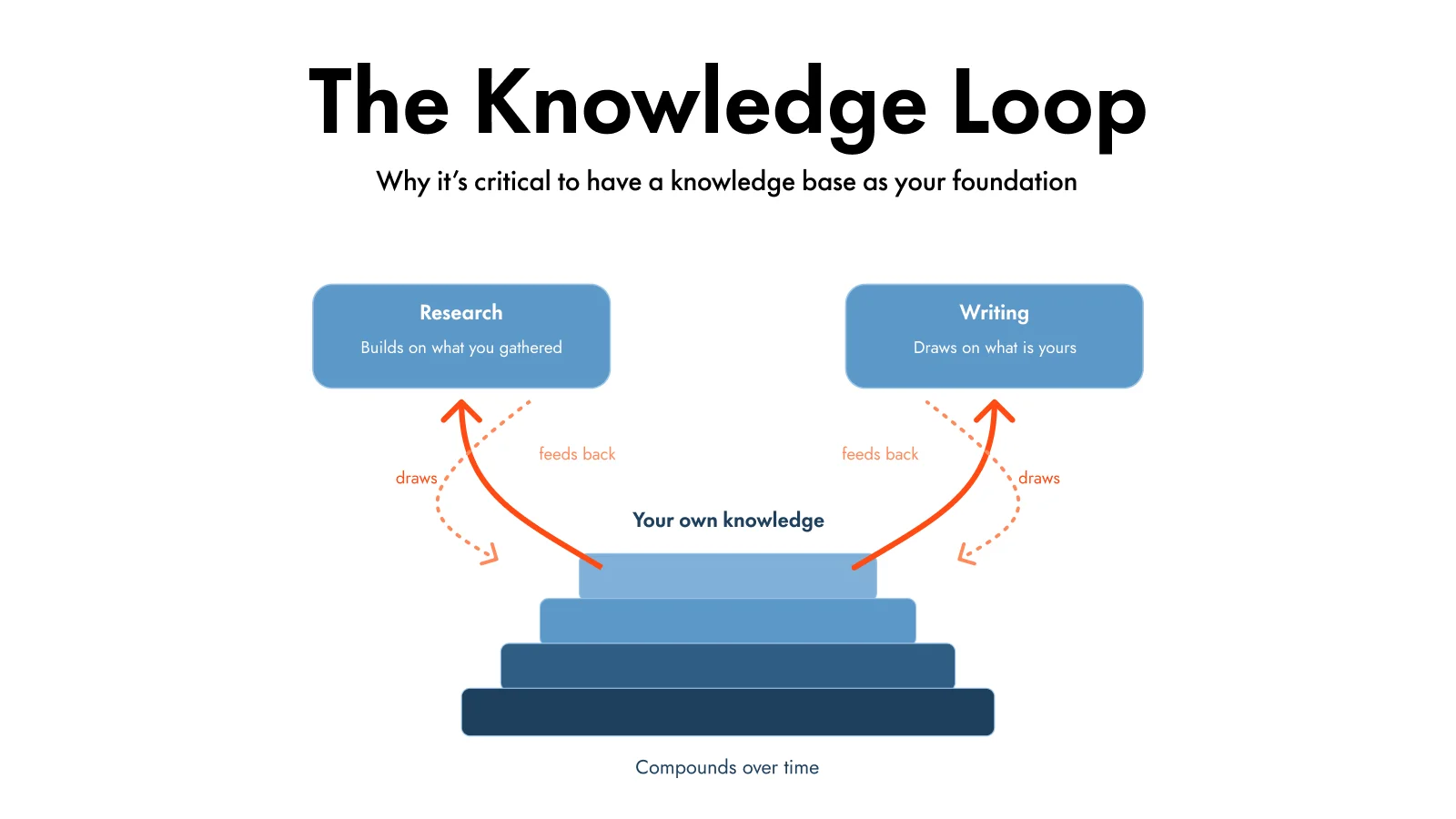
The knowledge loop: research builds on what you’ve gathered, and everything you keep feeds back into your knowledge base as it compounds over time.
Why use Recall for research
- Spend your research time with intention: read a two-minute summary to decide whether a paper, talk, or article deserves your full attention, instead of skimming everything and hoping.
- Your knowledge compounds: every source you save and every answer you keep feeds back into your knowledge base, so each project starts ahead of the last instead of from scratch.
- Grounded in your trusted sources and your own notes: chat answers from the sources you’ve chosen to trust and the notes you’ve written first, before the open web, with citations back to the original.
- Synthesize across everything you’ve saved: surface themes, gaps, and disagreements across a whole topic at once, instead of rereading every paper end to end.
- See how ideas connect: Recall links related concepts across your sources and maps them in a knowledge graph, so you can navigate a field, not just a folder.
- Remember what you read: turn key findings into quizzes and let related sources resurface as you browse, so your reading actually sticks.
What you’ll build
- A research knowledge base that brings your trusted sources and your own notes together, tagged by topic
- Summaries on each source so you can decide where to spend your time
- Synthesized answers across everything you’ve saved on a question
- Connections and a knowledge graph that map how ideas relate across sources
- A writing workflow that drafts from your knowledge base instead of the generic web
The six-part AI for Writing and Research guide walks through building a topic knowledge base, capturing your own thinking, drafting, and fact-checking, with a video you can follow step by step. This page stays focused on the researcher workflow: building your knowledge base, synthesizing across sources, and remembering what you read.
See it in action
The research workflow, step by step
Build your knowledge base, understand each source, synthesize across it, then write it up and remember it. Expand any step to see what it looks like.
Part 1Build your research knowledge base
Get every source into one place, along with your own notes, so your research lives together instead of scattered across downloads and tabs.
- Research on the web with the extension: as you read, use the browser extension to decide what’s worth keeping and save it to your knowledge base in one click, without breaking your flow. It’s the fastest way to research and capture at the same time, so only the sources you trust make it in.
- Upload papers: add PDFs up to 250 MB each through Add Content. See PDFs.
- Add your own notes: click the pen icon (✎) next to Add to create a blank note, or add notes in a saved card’s notebook. Type
/anywhere in the notebook to open the block editor (headings, lists, to-dos, callouts, and more) so you can capture ideas, hypotheses, and takeaways alongside the sources they relate to. See Note-taking in Recall. - Bulk import: bring in a backlog of articles and videos at once with bookmark imports.
- Tag by topic: file each source under a topic tag like
Literature Review / Attentionso it’s interpreted against everything related.
Example: While researching online you save eight papers and three talks with the extension as you go, add your own notes on each, and tag them all Active Recall, so your sources and your thinking sit together in one knowledge base.
Part 2Understand each source
Saving a paper isn’t the same as understanding it. Distill each source before you synthesize.
- Summarize: generate a concise or detailed summary of any paper, talk, or article.
- Read the full text: the reader gives you the complete document or transcript, so you can search for an exact quote or jump to a section.
- Check your understanding: click Generate Questions to test whether a source actually stuck.
Example: For a dense methods paper, you read the summary first, then jump to the exact section in the reader to check how they ran the experiment.
Part 3Synthesize across sources
This is where a pile of papers becomes a literature review. Open global chat in the left panel by clicking the AI icon and ask questions across the whole topic at once.
- Chat with your knowledge base: open global chat in the left panel by clicking the AI icon,
@mention your topic tag, and ask across every source you’ve saved. See global chat. - Ground it in your sources: switch to Recall only when you want answers from your knowledge base alone, or Recall + Web to go wider.
- Trace every claim: answers come with citations and source chips that jump to the exact passage, so you can verify against the original.
- Map the field: use connections and the Knowledge Graph to see how concepts relate across sources.
Example: You ask, “Where do these studies agree and disagree on spaced repetition intervals?” and Recall answers from your twelve papers, with citations you can open to confirm.
Part 4Write it up
When it’s time to turn research into output, your knowledge base becomes the raw material for a draft that sounds like you.
- Generate from your sources: combine your topic research, a best-practice checklist, and your own thinking into a draft grounded in your work, not the generic web.
- Follow the full method: see AI for Writing and Research for the six-part walkthrough on researching, capturing your own thinking, drafting, and fact-checking.
Example: You draft a related-work section by referencing your Active Recall tag and your own notes, then cross-check the draft against the original papers before submitting.
Part 5Remember what you read
Research is only useful if it stays with you. Keep your sources active instead of letting them fade.
- Quiz key findings: turn the results that matter into quizzes and review them with spaced repetition.
- Resurface as you work: related sources reappear as you browse the web with Augmented Browsing.
- Search months later: find any paper or finding with natural language long after you read it.
Example: Six months after a review, a reviewer asks about a specific finding. You search a phrase you remember and land on the exact paper and your notes on it.
How your research becomes part of your second brain
For a researcher, the most valuable asset is everything you’ve already read and noted, and the easiest thing to lose. In Recall, every paper, talk, and article you save joins your own notes in one connected library: tagged, summarized, linked, and searchable. Your sources stop being a download folder and become a research knowledge base you can question, synthesize, and build on for years. See how it all fits together in the AI Second Brain guide.
Related Recall features
- Chat with all your content
- Quiz and spaced repetition
- Graph overview
- Recall augmented browsing
- Bookmark imports
Related guides
Frequently asked questions
What is the best AI for research?
The best AI for research is one where your knowledge compounds instead of resetting every session. Most AI research is a series of one-off chats on the open web, so nothing you find today builds on yesterday. Recall grounds answers in your trusted sources and your own notes first, so every source you add makes the next question smarter and your research builds into a knowledge base instead of being thrown away.
Can I chat with my research papers in Recall?
Yes. In Recall you can chat with a single paper or across your whole research knowledge base at once, asking questions like “what do these studies agree and disagree on?” Recall answers from your trusted sources and your own notes first before reaching for the internet, and every answer links back to the exact passage, so you can verify it against the original.
How is Recall different from ChatGPT for academic research?
A standard chatbot grounds its answers in the open internet and whatever it remembers about you, and each chat is thrown away. Recall grounds answers in the papers and sources you’ve actually saved (with optional web search), lets you save useful answers back under topic tags, and connects related ideas across your library. So instead of restarting every session, you build a trusted, citable research base you can chat with later.
Can Recall help with a literature review?
Yes. Recall is well suited to literature reviews: import your papers and sources, summarize each one, then open global chat in the left panel by clicking the AI icon and @ mention your topic tag to surface themes, gaps, and disagreements across the whole collection. Recall’s connections and knowledge graph map how concepts relate across sources, so you can see the shape of a field instead of reading every paper end to end.
Can I import my existing papers and PDFs?
Yes. You can upload PDFs up to 250 MB each, paste links, save with the browser extension, or bulk import bookmarks for talks and articles. Once they’re in Recall, your papers become searchable, connectable cards that sit alongside your own notes and everything else you save, and that you can chat with as one knowledge base.
Does Recall keep citations back to the source?
Yes. When you chat with your sources, Recall’s answers include citations and source chips that jump you straight to the exact passage, timestamp, or page. That means you can trust an AI answer about your research because you can always trace it back to the original paper or talk.