Active Recall and Spaced Repetition for Lifelong Learners
Recall helps you rediscover the joy of learning: follow what genuinely excites you, save and connect everything you explore, and use active recall to actually remember what you learn.
Most of us consume more than ever (podcasts, videos, articles, documentaries) but much of it stays surface-level, good for small talk, not for real growth. We save things we never revisit. We forget the details of a documentary we loved a month ago. The spark of curiosity that made learning feel exciting can get buried under years of routine.
Recall was built to change that. One of our core goals is to bring back the joy of learning: to help you follow your curiosity, go deep on the topics that genuinely excite you, and reignite the passion for discovery. When learning feels meaningful again, you’re far more likely to stick with it, and remember what you learned.
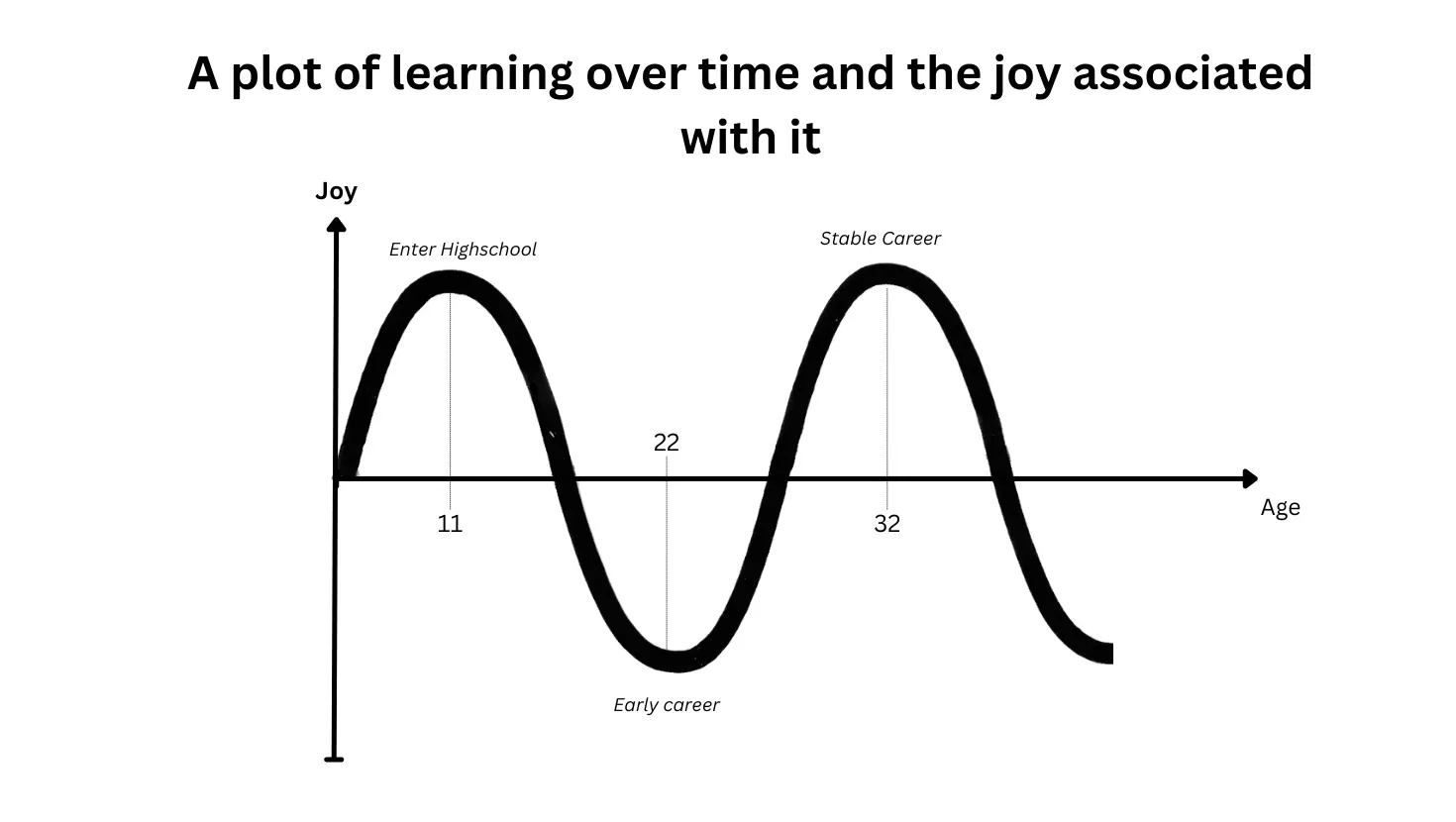
The image above captures something most of us recognize: joy in learning peaks early, then dips as life gets busy and growth turns into routine. But that curve can rise again. Carving out even a small part of your day to explore something you actually care about, not because you have to but because you want to, can reignite that spark.
That doesn’t mean ignoring the science of memory. You still watch a long video, listen to a podcast, or read an article and forget most of it within days unless you revisit it. Recall closes that loop quietly in the background: save what matters, quiz yourself on what you chose, and review it at the right time so your knowledge accumulates instead of resetting. The techniques work in service of the joy, not the other way around.
Read more about rediscovering the joy of learning in this blog post.
Why use Recall for lifelong learning
Recall is a place where all the content you care about lives together: podcasts, videos, articles, PDFs, and your own notes. It grows with you, stays organized, and helps you actually remember what you’ve saved.
- One home for everything you learn: every video, podcast, article, PDF, and note you save joins one knowledge base that keeps growing with you over years, not scattered across bookmarks, screenshots, and apps you forget to open.
- Organized without the work: Recall automatically tags and connects your content by topic, so you don’t have to maintain a folder structure or spend time filing things away.
- Your own notes alongside what you save: add your thoughts, highlights, and ideas directly to any card, so your perspective lives with the source material.
- Chat with your knowledge: open global chat in the left panel by clicking the AI icon to ask questions across everything you’ve saved and get answers grounded in your own library first, not the generic internet.
- Quiz yourself when you want to remember: generate questions from the content you chose and test yourself, so the ideas that matter actually stick.
- Review at the right time: Recall Review resurfaces what you’re about to forget, adapting to how well you answer so you spend time where it matters.
- Build a habit that compounds: streaks, notifications, and quick mobile quizzes turn learning into a routine instead of a one-off binge.
What you’ll build
- A lifelong knowledge base with everything you read, watch, and listen to
- Automatic organization by topic, with your own tags and connections on top
- Your own notes and thoughts connected to the original source material
- Quizzes generated from content you care about, in the formats you prefer
- A review schedule that adapts to what you’re still learning
- A daily or weekly habit that makes knowledge compound over time
Watch and follow along
Expand each part below for the step-by-step walkthrough of Quiz 2.0, Recall Review, Recall Shared Challenges, and streaks. Click the timestamp on any part to jump straight to that moment in the video.
Part 1The forgetting curve
Recall is built to offset that forgetting curve. Save what matters to you, and Recall can create personalized quizzes that resurface at the right time so the material actually sticks.
Part 2Recall recap
Once content is saved, you can skim the summary, chat with the content, save useful answers to your notebook, jump to timestamps in videos, and see extracted connections.
Part 3Quiz 2.0
- Choose the number of questions
- Generate multiple choice, fill-in-the-blank, matching, flashcards, true/false, short answer, or ordering questions
- Pick easy, medium, hard, or mixed difficulty
- Include explanations for context after answering
- Include hints when you get stuck
- Add questions to Recall Review so they become part of your spaced repetition schedule
Part 4Recall Shared Challenge
Recall Shared Challenges make learning more social. You can create a Recall Shared Challenge from saved content, share it, and compare how everyone does on the same material.
Part 5Recall Review
If you keep getting something wrong, you'll see it more often. If you keep getting it right, you'll see it less often. Questions that you add to Recall Review are shuffled into your schedule, and the intervals adapt based on how well you answer.
You can also filter review questions by due date, type, difficulty, and tag, so you can review one topic at a time.
Part 6Streaks and settings
You can also see your all-time stats and look back historically to understand your overall learning progress.
Part 7Take the Recall Shared Challenges
You can use the same idea with friends: make a Recall Shared Challenge from something you've saved and share it with people who care about the same topic.
The lifelong learning workflow
Save what matters, let it organize itself, chat with your own knowledge, quiz yourself when you want to remember, review at the right time, and build a habit that compounds. Expand any step to see how it works.
Part 1Save everything you care about
The peace of mind starts here: everything you want to remember lives in one place instead of scattered across bookmarks, screenshots, and apps you forget to open.
- Paste a link: drop in a YouTube video, podcast, article, or any supported URL. Recall pulls the content and generates a summary automatically.
- Upload PDFs: click Add Content and select PDFs to upload documents up to 250 MB each.
- Save as you browse: use the browser extension or mobile share sheet to capture content in one click while you’re reading or watching.
- Take your own notes: click the pen icon (✎) next to Add Content to create a note. Your thoughts live alongside everything else you’ve saved.
Example: You finish a documentary on Roman history, save it to Recall, and skim the summary over coffee the next morning. It’s there whenever you want to return to it.
Part 2Let Recall organize it for you
You don’t have to file anything. Recall reads what you save and organizes it automatically, so structure emerges without effort.
- Automatic tagging: Recall tags content by topic based on what it’s about, so similar material groups together.
- Automatic connections: related content links together, revealing patterns across what you’ve saved over months or years.
- Add your own structure: create your own tags, connections, and notes when you want to. The system works with or without manual input.
- Search in plain language: find anything across your whole library without remembering exactly where you saved it.
Example: You’ve saved content on AI, philosophy, and history over the past year. Recall connects them by theme, so opening one card surfaces related ideas from across all three topics.
Part 3Chat with your own knowledge
Once you’ve saved content, open global chat in the left panel by clicking the AI icon. Unlike chatting with a generic AI, Recall answers from the content you’ve saved first, then the open internet only if you want it to. This is one of our most powerful features, and one of the most underused.
- Your knowledge comes first: ask a question and Recall answers from your own saved videos, podcasts, PDFs, articles, and notes, with the sources referenced, before reaching for the wider web.
- Set the context of your chat: type
@followed by a note’s name to chat with one specific item, or@followed by a folder or tag to chat with everything in that group. - Talk to the experts you trust: import everything from a creator or field you care about (every episode of a favorite podcast, a stack of papers) and have a conversation grounded in their knowledge.
- Talk to a version of yourself that remembers everything: add your own notes, journals, and saved ideas, and ask across them in plain language instead of trying to recall where you read something.
Example: You’ve saved dozens of nutrition podcasts and articles. Instead of searching through them, you ask “what have I saved about protein intake as you age?” and get a synthesized answer drawn from your own library, with each source linked.
Part 4Quiz yourself on what matters
When you want to actually remember something, not just have it saved, open the Quiz tab and generate questions.
- Choose the number of questions and pick from multiple choice, fill-in-the-blank, matching, flashcards, true/false, short answer, or ordering formats.
- Set the difficulty: easy, medium, hard, or mixed.
- Include explanations for context after answering, and hints when you get stuck.
- Create your own questions if you want to target specific ideas, or edit generated ones to make them your own.
- Toggle Schedule for review to add questions to your spaced repetition cycle automatically.
Example: After saving a long interview with an economist, you generate ten questions on the key ideas. A week later you still remember the main points.
Part 5Review at the right time
Recall Review resurfaces questions right before you’re about to forget them. Access it from the Review icon (hat) in the left sidebar.
- Adaptive intervals: questions you keep getting wrong appear more often; questions you nail appear less often.
- Filter your review: narrow by due date, question type, difficulty, or tag to focus on one topic or interest at a time.
- Start Review: click Start Review to work through your most-due questions in one session.
Learn more about spaced repetition.
Example: You tag all your philosophy content philosophy and run a ten-minute review filtered to that tag each evening. Ideas from months ago stay fresh.
Part 6Build a habit that compounds
Knowledge only accumulates if you keep showing up. Recall helps you make learning a routine instead of a one-off.
- Track streaks: build a daily or weekly streak so review becomes automatic.
- Enable notifications: turn on email and push reminders when questions are due.
- Review on mobile: install the Recall app on iOS or Android and run a quick quiz anywhere.
- Check your stats: look back at all-time progress to see how your learning compounds over months and years.
- Share with friends: turn any quiz into a Recall Shared Challenge and share it with others who are interested in the same topic.
Example: You swap ten minutes of social media before bed for ten minutes of Recall Review. After a few months, the ideas from documentaries and podcasts you consumed weeks ago are still there when you need them in conversation.
- Save first, decide later: the peace of mind comes from knowing everything you care about is in one place. You don’t have to quiz yourself on everything, just the ideas that matter most.
- Let the system do the work: automatic organization and spaced repetition mean you don’t have to remember what to review or where you filed things.
- Make it a habit, not a project: ten minutes a day compounds into a knowledge base you can actually use over years.
Example daily routines
The same learning loop adapts to very different lives. Here’s how three people use Recall to actually remember what they consume.
The curious generalist
Challenge: reads widely across history, science, and culture, but can’t retain details from everything saved.
- Morning: saves a long-form article or podcast episode and skims the summary over coffee.
- Commute: generates five quiz questions from yesterday’s save and runs them on the mobile app.
- Evening: adds new questions to Recall Review and checks streak progress.
- Weekend: creates a Recall Shared Challenge from a favorite documentary and shares it with friends.
Value: knowledge from disparate topics starts to stick and connect instead of fading by the next week.
The busy professional
Challenge: needs to stay on top of industry news while balancing a packed work week.
- Morning commute: before picking a podcast, checks whether it’s worth the time with a quick summary.
- Midday: saves key articles with the browser extension and generates quiz questions from the most important ones.
- Afternoon: runs a filtered Recall Review session tagged to the current project before a meeting.
- Evening: explores connections between saved content and runs a quick quiz on the week’s key ideas.
Value: stays confidently informed without rereading everything, and retains the trends that matter for work.
The language learner
Challenge: learning across languages and retaining complex technical vocabulary.
- Morning: saves tutorials and articles, generates summaries in the target language.
- Afternoon: creates flashcard-style questions for new vocabulary and schedules them for review.
- Evening: runs Recall Review filtered to language tags, focusing on words still getting wrong.
- Weekend: shares a Recall Shared Challenge with a study partner learning the same material.
Value: vocabulary and concepts stick across languages because review is spaced and targeted, not cramming before each session.
Frequently asked questions
What is active recall?
Active recall is a study technique where you retrieve information from memory instead of rereading it. The act of pulling an answer out of your head, rather than recognizing it on the page, is what builds durable memory. In Recall you practice active recall by generating quiz questions from any content you’ve saved and testing yourself on them.
What is spaced repetition?
Spaced repetition is a learning method that schedules reviews at increasing intervals, bringing material back right before you’re likely to forget it. It works against the forgetting curve, the tendency to lose most of what you learn within 24 hours without review. Recall Review applies spaced repetition automatically: questions you get wrong come back more often, and questions you nail come back less often.
How to remember what you read, watch, and listen to?
To remember what you consume, you need to capture the key points and revisit them with active retrieval, not just save the link. In Recall you save the source, generate quiz questions from it, test yourself, and add those questions to Recall Review so spaced repetition resurfaces them right before you forget. Over time your knowledge accumulates across everything you’ve saved instead of resetting every week.
How does Recall help me remember what I learn?
Recall closes the loop between consuming content and remembering it. You save a video, podcast, PDF, article, or note, generate questions from it, test yourself with active recall, and review those questions over time with spaced repetition. Instead of forgetting most of what you consume within days, your knowledge accumulates and builds on everything you’ve learned before.
Can I generate a quiz from a YouTube video or podcast?
Yes. Save the video, podcast, PDF, article, or your own notes into Recall, open the Quiz tab, and generate questions from it. With Quiz 2.0 you choose the number of questions; pick multiple choice, fill-in-the-blank, matching, flashcards, true/false, short answer, or ordering formats; set the difficulty; and add explanations and hints. You can then add those questions to Recall Review so they enter your spaced repetition schedule.
How is Recall Review different from Anki or Quizlet?
With Anki or Quizlet you usually build decks by hand. In Recall, the questions come straight from the content you’ve already saved and care about, so there’s no separate deck-building step. Recall Review then runs the same proven techniques, active recall and spaced repetition, adapting the intervals to how well you answer, and you can filter your review by due date, type, difficulty, and tag to study one topic at a time.